PhishStick Blocked Phishing Email Highlight - September 2026
For the month of September, PhishStick successfully blocked 28,006 attacks, which is an average of 903 attacks per day. The most common attack type remains Phishing: Credential.
If you received any of potential Phishing or Spam email, please forward the email to Phishing@rpi.edu, or report through the Report Message button in Outlook.
Trending Attack - SharePoint Online sender impersonation
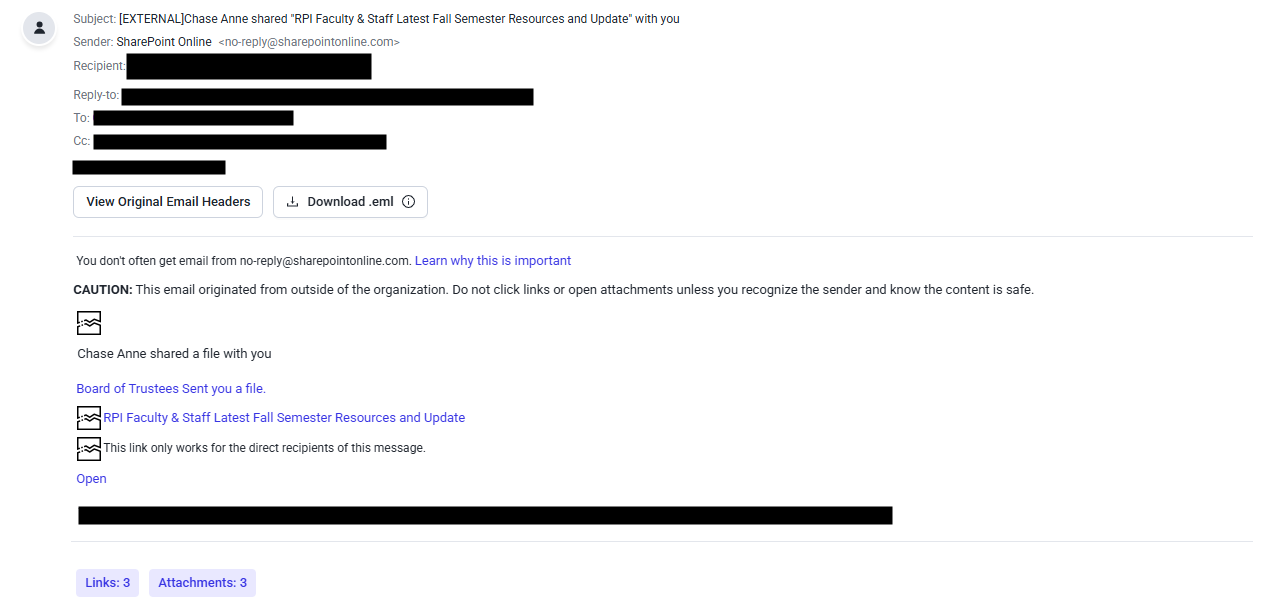
The email below, subject-lined "[EXTERNAL]Chase Anne shared "RPI Faculty & Staff Latest Fall Semester Resources and Update" with you," was sent to over 400+ RPI mailboxes in rapid succession, and was blocked by PhishStick before making it to Student, Faculty, and Staff mailboxes.
While it appears that this email comes from no-reply@sharepointonline.com, which is a legitimate address through Microsoft for SharePoint Online, it exhibits several Phishing red flags. Please see analysis provided below:
Key Security Signals:
- Sender Impersonation - This bad actor impersonated the brand "Microsoft" as the display name of the email shows SharePoint, however, the Reply-to: and CC: of the email are to a malicious sender domain attempting to Phish RCS Account credentials.
- [External] Flag - Based on this email's subject line, if this was a legitimate email from RPI's SharePoint Online, this would not contain the [External] and CAUTION: message, as this would be an internal notification through RPI's SharePoint tenant.
- Malicious URLs - Hover/Don't Click! - The URLs in this email direct to a fraudulent Microsoft login page. This is a tactic by bad actors to create a fake Microsoft or other service login page to capture victim credentials.
- Mass-Sent Phish - This email was sent (with multiple different malicious senders/domains) to over 400+ RPI Mailboxes. This is a tactic called bulk-phishing, where bad actors send identical emails to as many mailboxes at once, hoping a small fraction of recipients will fall for the Phish.
- Failed Email Authentication - This email did not pass any Email authentication such as Sender Policy Framework (SPF), DomainKeys Identified Mail (DKIM), or DMARC (Domain-based-message authentication, reporting and conformance), which are all security protocols that would have passed if this was a legitimate email coming from Microsoft.
What to do?